Do You Need to Overthrow the Schedule for January?

New Year, New You?: Do You Need to Overthrow the Schedule for January?

Written by Chelsea McLeod

It’s a new year; is it going to be a new you? Are you anticipating a significant change this year or hoping to keep it relatively status quo? Some people find it necessary to make significant changes and completely revamp routines, family plans and schedules. Others are happy to settle into the familiar routines and schedules that worked before the holidays.

As we know, January is typically the time for reflecting on the past year with its successes, failures, wins and losses, drafting resolutions, setting goals and making plans to accomplish for the new year. It is also the time for getting back to routine after a hopefully relaxing holiday break. After a week or two of late nights, travel, sleep-ins and, in many cases, not knowing what day it is, you and your kiddos are likely feeling ready for the consistency that routinely brings. So this begs the question: Do you need to overthrow the schedule for January?

“Do what works for you and your family; you know best.” 

It comes down to personal preference and what you know will work for you and your kids. Some people thrive on change and the excitement that comes from a difference from the normal. Others need that structure, predictability and consistency in their lives. You know yourself and your kids best, so make sure to consider that before making a significant change when asking yourself, ‘do you need to overthrow the schedule for January?’ 

Finally, there is no harm in keeping things the same if that’s what works best for your family; maybe there is something in your previous routine that you need to change for you or your kids to be successful or learn better. If this is the case and you feel a change is needed after a break is the best time to make any changes since you and your family have already been out of routine. So, in essence, what you do in January is entirely up to you, so change things up…Or don’t; you are entirely and totally in charge of your homeschool schedule. Do what works for you and your family; you know best.


Change things up.

New homeschool year

Why not let the New Year work for you by changing things up? 

You could try some of the following suggestions to see if they work for your family during the New Year:

  • Add something new to your homeschool plans.

    • You could try a new tactic for Art, like a Schoolio Art Class or add an Audiobook for listening comprehension skills. Or you could add some hands-on activities to your math program instead of pencil/paperwork.
  • Do something different.

    • Maybe you have been following a book program for math or ELA. You could try a more computer-based program, like Schoolio Digital, to change it up in January.
  • Switch up the schedule. 

    • Maybe you have done Reading first thing up until this point? It could be time to change that up and do your Math when you first begin your homeschooling day.
    • Or maybe plan a daily time slot for fun reading. Books and things that are not part of the learning plan. It’s essential to read, and many of us would prefer to do so with a book we are interested in, not one that has been assigned; this goes for kids as well. Also, this gives you an excellent opportunity to read yourself and model reading behaviour. Sometimes the best way to learn is to watch others.
  • Join a homeschool co-op, a book club, or start your own. 

    • Depending on where you are, there are many options for a Homeschooling Co-op. You could join a local chapter; they often meet once a week for learning and sometimes plan field trips together.
  • Make tents or blanket forts and let your children do their school underneath. 

    • Kids love forts! There is something so fun about a homemade tent/fort with lots of pillows and twinkly lights.
  • Have a hot chocolate dreaming party next to the fireplace. 

    • This could be a break during the day or planned as an evening after supper. Just a great way to connect with your kids and spend time together. Talk about school or don’t, enjoy each other’s company.
  • Plan a living room slumber party and talk about family bucket lists.

    • This does not have to be specific to before I die; in recent years, people have begun making “bucket lists” for other time frames, such as before I graduate or before I turn 13, etc.
    • Enjoying your kids’ company and decompressing with them is also fun. You can create a bucket list for them and the family. Maybe you want to travel somewhere before your kids are a certain age. You can learn a lot about your kids when dreaming and talking about life plans, and your kids will appreciate being included in family planning.
  • Get outside!

    • In January, your kids would much rather be outside building a snowman than studying books, right? So why use that interest to plan your lesson and make them more engaging?
    • You could study snow, for example. You could measure snow in different states of matter, taste snow, and make snow cones, snow forts, and snowmen.
    • This could be the perfect opportunity to chart weather patterns. You and your kids could study your local weather patterns and compare them to others like Alaska, Iceland, or Sweden.
    • This might not work if you don’t live in a wintery location; however, you can constantly adjust to your environment. Maybe you need to study sand, the ocean, or the grass.

Or don’t.

Maybe you feel confident in the schedule and routines you planned at the beginning of your homeschooling year. Your kids were thriving with that schedule, and you are feeling good about your ability to juggle all the pieces. You Do Not have to change anything! No rule says January brings all kinds of changes, whether we like it or not.

Each family has a routine and schedule that works for them, and homeschooling is no different. You are in charge. Like Napoleon Hill once said, “You are the master of your destiny. You can influence, direct and control your environment. You can make your life what you want it to be.” So no, as asked in the title, You do not have to overthrow the schedule for January.

You can head right back into your pre-holiday routine, rest assured and with a smile. It is a New Year, but it doesn’t have to be a new schedule. So as we head into 2023, take some time to reflect and decide how to proceed with your homeschooling. Trust yourself, make whatever changes you need to make, or dust off that fall schedule and keep trucking. Enjoy. You Got This!


Home(schooling) for the Holidays: How and Why to Take a Break

Homeschooling and the holidays

Home(schooling) for the Holidays?: How and Why to Take a Break

By Chelsea McLeod

Just as Self-Care is essential to the homeschooling parent puzzle, so is taking breaks from the planned curriculum. Homeschooling offers many benefits, one of which is a flexible schedule. Homeschooling doesn’t often follow a traditional school day; you have break time during the day as the requirement of time spent schooling differs. As a homeschooler, you do not have to follow a traditional school calendar; you can choose your calendar, but taking breaks from your planned learning on your family’s schedule is essential.

Taking needed breaks is easier said than done for so many of us.

Homeschool Holiday

Home(schooling) for the holidays: How and why to take breaks from homeschooling.

We often feel guilty for taking time off or become overwhelmed by the concept that there is too much to do to take breaks. However, this is not the case, and on the contrary, it can be very healthy for you and your children to take breaks from traditional schooling. So first, you must allow yourself to make the mental space for holidays. You cannot worry about lessons and learning 24/7/365, or you will burn yourself and your children out.

There are many types of breaks, from planned, spontaneous mental health days or unplanned; permitting yourself to take those breaks, whether planned or unplanned, is crucial to the success of your homeschooling journey. But how? How to take these breaks is a different story. In the case of planned breaks, you can follow a traditional school calendar or even look at the work holidays of your spouse and friends.

This may include family or community commitments, events, or simply taking the summer off to allow your children to have a similar schedule to their friends, and you get some much-needed time off. Conversely, unplanned breaks can come from sicknesses, family deaths or unexpected hospitalizations. These things are unavoidable; however, sometimes we need to take a breath, make space for family connection and forget about the calendar for a short or even long while if necessary. The routine, plans and learning will be there waiting for us when we are ready and able to return to normalcy.

Why You Should Take Breaks. 

Why you should take breaks is easier to break down. Just because you have chosen to homeschool doesn’t mean you are not allowed to make space for some separation. You school from home, but you do not live in the school. This is an important distinction. I’m sure you know from experience that when you are doing too much of something, it can lead to burnout.

Well, the same applies to learning. You must care for yourself and make space for your interests and hobbies. In the same way, your kids need to have some time and space not connected to a learning outcome. On top of that, there are many reasons (we can only name a few here) why you should take breaks and direct the focus away from traditional learning.


Here Are Some Reasons Why Breaks Are Important: 

  1. You are in Charge. 

Like many, you chose to begin homeschooling in the first place to take charge of your time and calendar, right? So why not use that to your advantage and plan your break when it works for You? You make the plan; you know what to focus on and when. Could you make space in the plan for holiday breaks? So whether you celebrate Christmas, Hanukkah, Kwanzaa or the Winter Solstice, you can plan your days off from teaching and learning to best suit the schedule you set out. 

  1. Family First.

Similarly, being with and connecting with your kids is crucial to their emotional development. You are a parent first, and your children need you for more than just teaching them academics. Life skills and emotional development require an emotional connection. Taking the time to bake cookies together or read a Christmas story is okay because it will help your child build emotional intelligence. Family traditions, religious/non-religious holiday practices or time spent together are always more important than academic learning.

  1. Tomorrow is Not Guaranteed. 

This one sounds sad to say, but it is true. No one knows what tomorrow will bring, so take the time to make those memories. If you skip picking out a Christmas tree together or carolling with a relative to keep going with your curriculum, you risk losing your children. What if that relative isn’t around next Christmas? So take the time while you know it is here to create those memories and connections. 

  1. Homeschooling Requires Less Time. 

Most homeschooling families complete their lessons in less time than a traditional in-person school day. For this reason, you often get naturally occurring breaks during the day or only homeschool for part of the day. And, if you are a curriculum person who likes to follow that checklist, you will easily find and plan how to push through or make up for lost time at a later date. 

  1. Learning Isn’t Just Planned Lessons. 

Learning happens all the time, especially for children. Baking cookies with your kids can include measurement learning; volunteering can involve learning emotional maturity or gaining “subject area knowledge,” as well as early civic or community engagement lessons. So much “counts” as part of a well-rounded educational experience for your child, so worry less about planned lessons and take in some other types of learning while you spend time with your kids. 

  1. Everyone Needs A Break, and That’s OK. 

The holidays, no matter which ones you celebrate, often come with much busier schedules. So while you are running around with various get-togethers, holiday concerts or wherever else the season brings, take the time to enjoy it. Remember, you are making memories, and the change of routine often means occasional periods of downtime, rest, and relaxation. After the holidays, you will be able to start fresh. 

  1. A Break is A Good Time to Make Changes. 

Speaking of starting fresh, if things in your homeschool plan are going differently than you envisioned after a break is an excellent time to make changes. You can take the time during the holidays to explore other approaches or make new plans. Then, when you’re ready to return to it, you and the kids will have had a natural break, which can make the transition easier. 

  1. Other Relationships Are Important Too. 

Whether those relationships are with friends, mentors, extended family or activity leaders, the holidays are a great time to make space for these. So give your children the opportunities to connect with others outside the immediate family group. It can be problematic in your everyday routine to find time to do this, but holiday events often shift focus to spending time with important people to your child. 

  1. They will Grow Up; You Don’t Want to Miss It. 

That’s right, I said it! And no, I am not trying to “rush” you or make you cry, but the reality is that before you know it, your littles will be grown, and your traditions will have to adjust. Your holidays will no longer be entirely a time of downtime but could involve part-time jobs and studying for finals. Eventually, they will grow up, move out and get their apartment. They may be going off to university or work, and while they may have time off, they may not be able to get home on all their days off. So be intentional with the time you have now, and put down the lesson planner; the algebra problems or the poem unit you had planned isn’t as important as building relationships with your kids.

Homeschooling and the holidays

Summary: Home(schooling) for the holidays: How and why to take a break.

Amid the busy day-to-day of raising little ones, it is hard to imagine that it will ever be different; believe it or not, there will come a day when you will miss the “help” baking cookies, the constant questions (or screaming) and the stepping on toys at every turn. For now, take the time to enjoy your kids because your family won’t always be this easy to connect with; they won’t always be together under one roof. One day, they will be grown, possibly with a family of their own, and you want them to look back fondly, remembering their time at home with you and use those memories to create their traditions. After the holidays, a new year with new lessons will be waiting, but for now, embrace the change of routine and lean into the break for both yourself — and your kids.

Enjoy your family time.

Click Here to check out 15 ways to find joy during the holidays! 


The Future of Education: An Immersive Learning Environment.

The Future of Education: What Will Learning Look Like in an Immersive Learning Environment?

This month, Schoolio will launch its Winter Wonderland immersive learning world, which has been much anticipated after the debut of Dino World in the summer. We’re so excited to share it with our customer base of parents and kids so you can learn about the future of education: An immersive learning environment. 

The future of education: What is immersive learning?

If you’re a parent who is not really into the tech-innovation scene, you may wonder- what is an “immersive learning experience”? An immersive learning experience takes users into a 3D virtual world- well beyond the 2D video experience of platforms like YouTube that use passive observance. In an immersive 3D world, the user has an avatar representing them and moving around in the environment. If you have kids who like to play video games, you’re probably familiar with this type of environment- Minecraft, Roblox, and Fortnite are all 3D immersive environments. Picture an immersive, active, social, 3D environment like Roblox, only the places your kid visits are curated, safe, and educational. Are you getting excited?

Children are bored with the classroom.

As a parent to two gamer children and a teacher in the K-8 grades, I can immediately see and appreciate the massive potential of immersive learning environments for kids and education- and I’m sure you can too! It’s no secret that kids are chronically bored in classrooms; it’s a fact. We know this when we have to force our children out the door each morning or when our children fake stomach aches to avoid the classroom. Also, when we find movies and tv shows with characters who lie, cheat, and sneak around to “escape,” the dredge of the school day is relatable. And when our kids get home at the end of the day, where do they want to go? Straight to their video games!

The benefits of an immersive learning environment are numerous, and the potential is infinite. 

Imagine the variety of topics, classes, and experiences that can be brought to life for our kids- allowing them to explore their interests and passions in a safe and fun space. Teachers and experts can be drawn from anywhere in the world to bring the best of the best content to students. Learning options will no longer be limited by geography or socioeconomic status. Imagine walking your avatar through a 3D rendition of the Louvre or the Museum of Natural History- you could take a virtual field trip to literally anywhere!

The future of education: Immersive learning style.

In addition to the multitude of options for course topics, field trips, and worldwide access to experts, the actual learning style in an immersive learning environment opens yet more doors to our children. Suddenly, children are not sitting and observing, like in a classroom, virtual school, or even learning through a platform like YouTube. Now they are a part of the experience. They are there. Their avatars can move around, touch, and build within the space. Tactile, hands-on experiences can be replicated, and children can learn and play with new tools. Not only is it safe (6-year-olds want to fiddle with a power saw? Let them have a go in a virtual, 3D environment where all their fingers will stay intact!), but it’s a better way to learn.

Project-based learning, where students learn through completing a project that shows the relevance and real-world application of knowledge, is preferred by teachers but challenging to implement within the constraints of a 1:30 classroom with limited resources. With an immersive learning environment, the options for creating these project-based learning experiences are limited only by the imagination. “Tell me, and I forget, teach me, and I may remember, involve me, and I learn.” is a famous Benjamin Franklin quote about the value of participatory learning. With a 3D immersive environment, every student can be a full participant in their own learning experiences- even if they are one of 30 in a typical American classroom, or they are in a remote Northern community, or they are in an impoverished part of Africa. The doors are open to every student.

The future of education: Immersive learning meets each student’s needs.

It doesn’t stop at customizing the learning style in an immersive environment- each student’s needs can be met exactly where they are by allowing each child to work at the exact level they need. In an immersive learning environment, a student “behind” their grade level can work at the level they need, with complete privacy from their peers around them. Challenges, projects, and independent work can all be tailored to each child to experience in the best way for them alone.

Another winning aspect of the immersive learning environment model of education is the social experience- often a criticized point of online or at-home learning. In a vast 3D virtual world, kids can choose who they interact with and how often. Voice and video chat allows kids to meet new friends, unrestricted by geographical boundaries. Students can make friends based on like interests rather than the year of birth- and the collaboration options and experiences are endless. Have you ever overheard your child coordinating with teammates in a video game? Imagine coordinating to solve a critical thinking puzzle, design a robot, or build a virtual bridge. Children can also choose the level of socializing they want to participate in, so your introverted kid who values their quiet time isn’t inundated and overwhelmed by a noisy classroom all day, and your energetic extrovert can choose to interact with new people every single day. 

The future of education: is it safe?

Now I know a lot of parents worry about the safety of these open-chat worlds, and that is a valid concern when the game itself doesn’t have many checks or securities in place (I’m looking at you, Roblox) but rest assured that the technology exists to protect our children in an immersive learning environment, we need to choose to implement it.

The Schoolio immersive learning environment gives parents and teachers options to restrict who their children interact with. Known friends only? Their age range? Language censoring? It’s up to you! In addition, let me introduce you to S.A.I., the Schoolio Artificial Intelligence technology that will act as each child’s assistant, protector, tutor, and friend. S.A.I. monitors chat interactions, can spot cyberbullying and inappropriate language, and even detect a change in mood in your child, alerting you to any potential problems your kids may be having. 

Schoolio Artificial Intelligence Technology will learn with your student.

Not only will S.A.I monitor social interactions in the immersive learning environment, but S.A.I. will learn with your child. While your child learns fractions, adverbs, and pond life, S.A.I. will learn about how they learn: What activity types create the best retention for them? What time of day is best for math or science? When are they tired and lagging; when are they energized and curious? What are your child’s passions, interests, and natural competencies and skills?

What are their areas of strength and weakness? All this data S.A.I. collects helps the immersive learning environment be tailored closer to your child’s uniqueness. Plus, with the Schoolio immersive learning environment, we care about more than grades and academics. We want to know how your child feels while they learn.

Essential knowledge to educate children effectively.

Emotional and mental wellness, as well as noting potential learning disabilities and neurodivergence, are essential knowledge to educate children effectively. Are they always anxious before math? Let’s recommend mindfulness and grounding activity before we begin. Are they feeling inspired by their current science project? Let’s see what other projects and courses are available for them to explore in that same topic area. Are they frustrated and wanting to quit during their building project? Let’s pause with a relaxation moment and a motivational quote and refocus before getting back at it. S.A.I. will also report to parents and teachers about how your child is doing overall, as a complete human, not just as an empty vessel filled with academic knowledge. 

Speaking of parents and teachers, do you wish you could collaborate more easily with all the educators and experts in your child’s ecosystem? Especially with our unique needs, kiddos, there can be many people throwing exercises, schedules, and tips at us that we need to coordinate into our child’s lives. With the Schoolio immersive learning environment, all the adults in a child’s life can collaborate and coordinate as a team. The teacher can add homework, the tutor can add practice work, the speech pathologist can add exercises, the sports coach can add drills to run at home, and the scout leader can add badge criteria notes- all with scheduling and calendaring options to keep it all organized in one place, and with S.A.I. by your child’s side to help them with time management and organization, so they are never overwhelmed. 

Immersive learning experiences aren’t coming; they’re here!

An immersive learning experience is the natural progression of technology into the realm of education. It is not “on the horizon”; it is here! The current education model hasn’t been updated since its inception during the Industrial Revolution; frankly, it’s time. Our kids are already playing (and learning!) in the immersive environment. It’s time to take it to the next level and use our technological innovations in our kid’s best interests to guide, educate, and assess in a modern way that prepares them for the real, tech-filled future that is bearing down on them. Imagine a universe as infinite as human imagination and your child’s ability to learn, play, and socialize wherever their dreams and passions may take them. That is what learning in the immersive, digital world will look like.

Click Here to Check out Schoolio Digital.

Learn about building stronger parent-child connections through digital learning. 

How to Navigate and Annotate Schoolio Digital Lessons

How to Navigate and Annotate Schoolio Digital Lessons

We are so excited that you are trying out the Schoolio Digital Platform. If you haven’t already, check out all the informative blogs about how to get started. This blog will cover one of the most fascinating parts of the Schoolio Digital Platform! Let’s learn how to navigate and annotate Schoolio Digital Lessons!

Are you ready to Navigate Schoolio Digital Lessons?

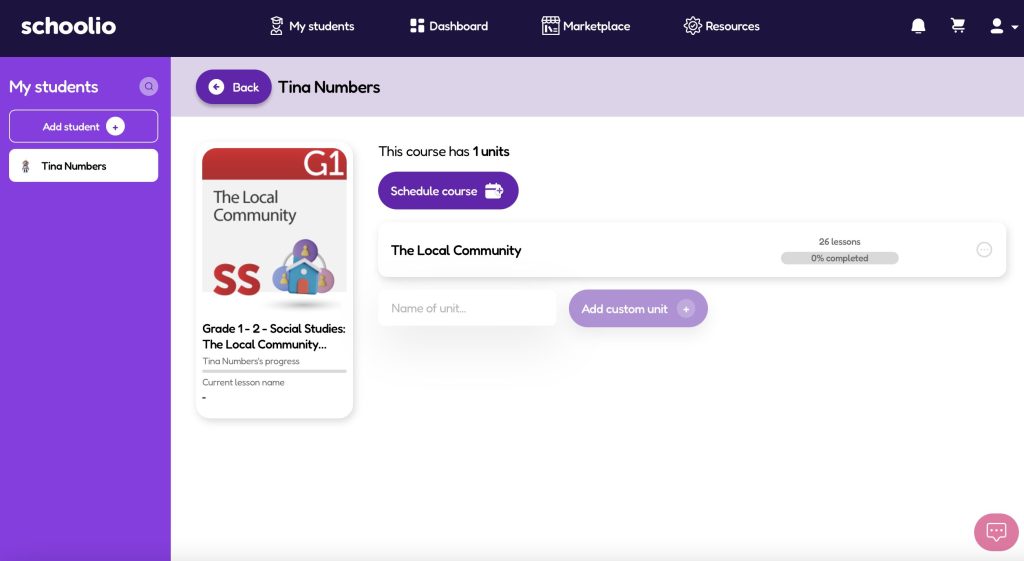
Step 1: Select the Unit

Select the unit

Once you’ve selected the course you want to check out, you can select the unit by clicking on it. For example, in the photo above, you would select ‘The Local Community’.

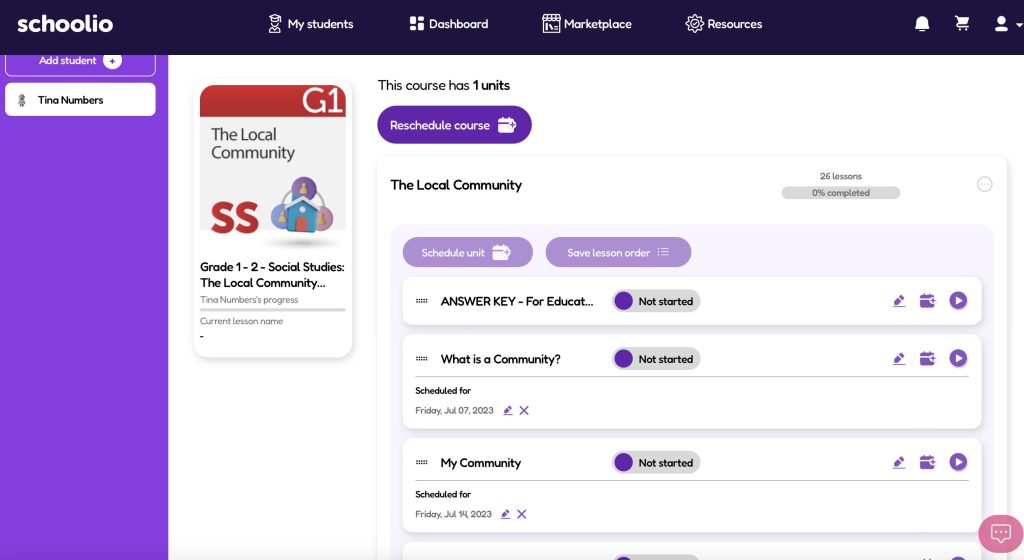
Step 2: Select the lessons

select the lesson

You will now see the different lessons available. At the top, on the parent portal, you will see the answer key that you can use to check your student’s work. When you’re ready, you can click the play button on the lesson.

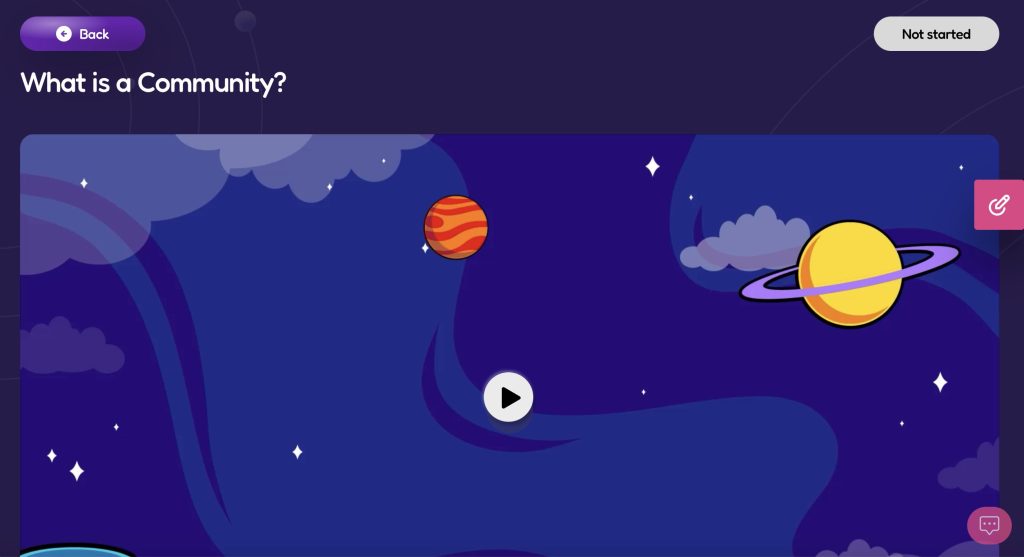
Step 3: View the lesson

The Schoolio Video Lesson

Now you can enjoy the video lesson by pressing ‘play’ on the video.

Step 4: Lesson Assessment

When the video has been completed, you can scroll past the video to the lesson assessment. Now you can click ‘Launch’ and go through the lesson assessment.

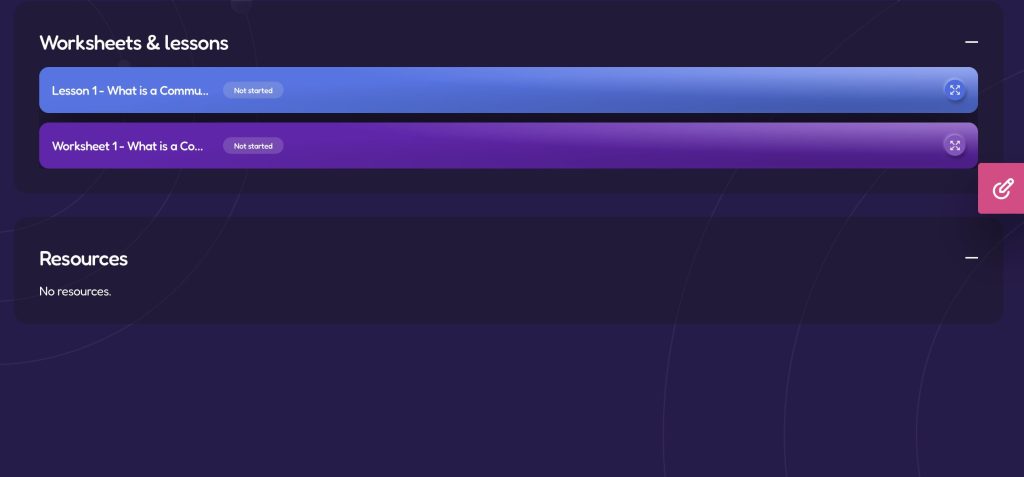
Step 5: Worksheet and Lesson Sheet

Worksheet

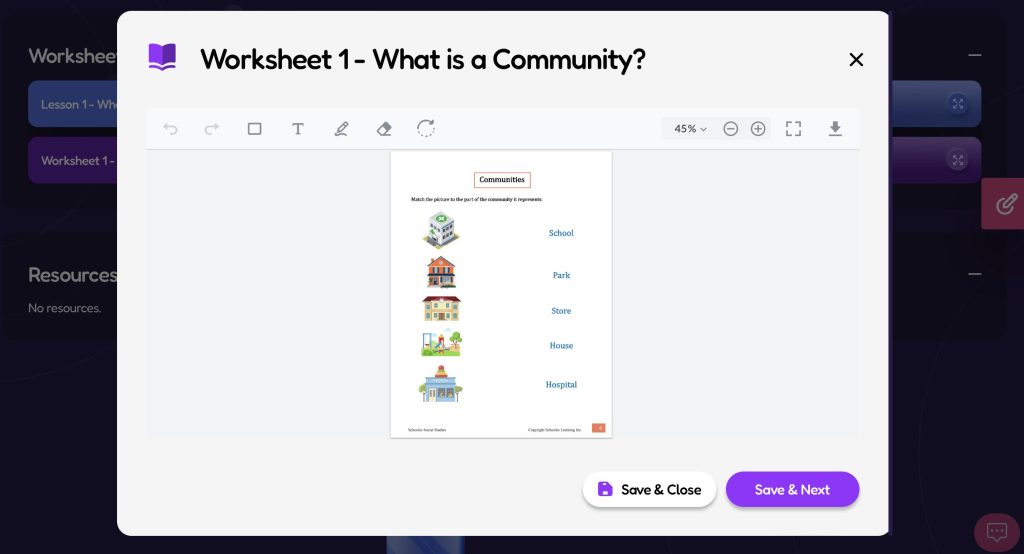
After completing the lesson assessment, you can scroll down to find ‘Lesson 1’ and ‘Worksheet 1’. Lesson 1 is the core lesson that comes with the Schoolio Curriculum. You can use lesson one to discuss the lesson concept further with your child. This is optional because everything in the lesson is included in the video lesson. Worksheet 1 is not optional, so you will need to click on the four-pointing arrows on the right side of the screen to open the worksheet.

Step 6: Complete the worksheet

Complete the worksheet

You can now navigate through the worksheet. There are two options to complete the worksheet. Using the annotation feature, you can do it on a tablet, iPad or computer. Or you can print the lesson and have your child complete their worksheet pencil to paper. To annotate, click on the T or Pencil icon at the top of the worksheet. Then use either the typing tool or drawing tool to complete the lesson. Make sure to Save your progress.

If you’d prefer your child to complete the worksheet with paper and a pencil. You can click the arrow pointing down on the right side of the screen. Download the worksheet to your device and print it. You can use the answer key to view your child’s responses and match them with the answer key.

Need further assistance?

Please let us know if you need further assistance understanding how to navigate the lessons.
Click here to book a Concierge Call. 

Watch this quick video about navigating the lessons.

Check out this thorough explanation video about all about how to navigate and annotate Schoolio Digital lessons.

How to Navigate & Annotate on Lessons.

If you have further questions, feel free to reach out to us! We’re always here to help.

How to Bring Writing into Other Areas

Sneaking It In: How to Bring Writing Into Other Areas

By Chelsea McLeod 

Sneaking it in: Writing

Writing in school is often seen as a skill linked only to English. It is often viewed as an immovable part of the curriculum and focus in this class. While this is technically true, it is not the whole picture. Not only is writing helpful in other areas, but it is also essential that it is practiced in more ways than can be offered in a single class.  Furthermore, while many of us inherently “know” this fact, it is often difficult to wrap our minds around it when planning the homeschool day and to try to incorporate writing with other subjects less traditionally associated with it. 


How To Incorporate Writing Into Other Subjects

So now, how does one add writing to other subject areas? When we traditionally think of writing, we think of essays, stories, paragraphs, spelling practice, etc. These are all great ways to practice and can be very effective in building skills, there are many other engaging ways to work on writing while learning other subject matter, and you can make it fun while you’re at it!


Science

  • Experiments 
    • Before you complete the experiment, have your learner make a prediction of the outcome and write it out. You can also have them include why they think what they do and have them add some proof or detail their thinking. 
    • For older students, you can create an assignment where they need to complete some research and explain in written form why the outcome was a certain way.


Math

  • Journals
    • Math can be tricky, but one of the best ways to incorporate more writing is to have your student journal. They can ask questions in their journal, formulate hypotheses, and even explain their thinking when it comes to solving problems.
    • They could also have a few minutes each class to write about their frustrations in math or celebrate successes they have been working hard to achieve.
    • Finally, in these journals, you can have them use the 3, 2, 1 method of exit slips (an informal assessment of understanding). They could write three things they learned in the lesson today, two things they found interesting and one more question they still have about the topic.  


  • Story Problems
    • You should assign your student to write a few story problems. You can give them an equation they can use, or they can come up with their own. They then write a short trial that can be solved using that equation. 
    • This can be done with another homeschool family or a group, and then the students could trade and solve the problems. That way, they are practicing their problem-solving skills and writing.
    • These are hard for lots of students to solve as it takes some higher-level thinking. It is important to piece together the necessary information and separate that won’t be used to solve the problem. For this reason, this might be a more effective exercise for older students who have had some practice and success with story problems.

Helping your kid write

Art

  • Explain Artistic Expression in Detail
    • Learners need creative freedom, but sometimes it is difficult for us to know what they have made/drawn, especially when they are younger. In this case, you could have them draw a picture and then explain it in written form. You could also ask them why they decided on this particular thing. 
    • They can draw a story’s characters and setting and then write it. This way, they can bring words to their visual work and a visual to their story. In many ways, this can sometimes even help to overcome a block. If they struggle to write or draw, you can have them do the opposite to spark their imaginations.


Social & History

  • Write a Textbook
    •  A great way to review and solidify information is to compile it into a cohesive and informative text. This assignment is best done with older students as it can benefit from lots of cumulative knowledge. I have used such an assignment in a High School Class in place of a final exam. 
    • A similar concept can be used with younger students. However, it would need to be a modified assignment that may include less extensive writing. 


Physical Education

  • Plan a workout
    • Your student could plan a workout, including the warm-up, all the exercises and cool down. They would then complete the training themselves or lead a small group. Once that is done, it would be a perfect opportunity for a reflection. A written piece of their thoughts on what went well, what didn’t and what they would or could do differently next time. 
  • Keep a Journal
    • They could keep a journal for a week or two. In this exercise, they could keep track of what they are eating and how much exercise they are getting or reflect on what they could do to change their habits or maintain a healthy lifestyle.

Some Other Ways to Get Kids Writing More


Thank you cards

Thank You Cards

  • For example, if you go on outings to the museum, a lecture or a play, you can have your students write a thank you to the workers or speakers. 
  • If you are a part of a homeschool co-op or group hosted at several different houses, your student could thank those hosts. 

Introduction Speeches

  • Similarly to the above, if you have a guest speaker at a homeschool co-op meeting, or maybe you put together an assembly in honour of a particular day, you could have your student plan and write an introduction. They could research the speaker and include some information about 

Pen Pals

  • This one is a classic! There are often programs in schools that connect kids to this type of thing. Similarly, several online programs or even Facebook groups explicitly aim for homeschool kids and connect them globally. 


You can get creative with incorporating writing practice into your homeschool day. Writing practice doesn’t have to be specific or focused in only one area; it can also be spontaneous, like writing a grocery list or planning out a phone call you have to make.

So, as you can see, there are many different ways to get your learners to write; honestly, this isn’t even an exhaustive list. There are many more ways for your student to strengthen their skills.

In the end, the more exposure they have to writing in their various subjects, the stronger they will become. So take some ideas from this list or come up with your own but most importantly, focus on the practice and not the subject matter and see how much growth your student writer can achieve. 


Getting started but aren’t sure how? Book a Concierge Call.

If you aren’t sure how to get started or what programs would best suit your child’s learning needs, then you can chat with one of our experts on a one-on-one Concierge Call, completely free!
Click here to book a Concierge Call. 


Running Records: How to Assess Your Child’s Reading Level

Running Records: How to Assess Your Child’s Reading Level

By Chelsea McLeod

Reading is a fundamental skill; it is an essential building block that supports all other types of learning. If reading is not developed, a child will struggle with other things in their schooling experience, which is just as crucial in a homeschool environment as in a traditional one. Therefore, while we all know that teaching our children to read is vital to their proper development and learning, it can be overwhelming to dive into and assess.

Running Records: Assess reading


Determining reading level is an integral part of the learning journey. Your learner should be reading differently levelled books depending on what situation they find themselves in. When reading on their own, they should be reading at an independent level, but when reading with you and learning, they should be reading at an instructional level.  An excellent tool used to assess reading levels is called a Running Record. This type of assessment can give a lot of information about your child’s reading skills; a running record can provide a whole picture of your child’s reading, what level they are reading at and how to move forward in teaching them. 

What is A Running Record?

A running record is a great tool to assess your learner as a reader. It is a snapshot of their reading. A running record evaluates a student’s word identification skills and fluency level. These are essential pieces of the puzzle of building strong, confident readers. Completing a running record involves writing down everything happening in the order it happens. Limiting the amount of editing you do as an observer as you record is essential. The idea is to record as much as possible so that you can gather a lot of information in a relatively short period and perform this type of assessment without much prep time. 

Choosing a Passage 

When completing a running record, ideally, both the observer/teacher and the learner/student view a copy of a passage. Also, because this is a tool often used for assessment purposes, the passage being read should be new to the student. When ready, the student reads his/her passage out loud; the instructor records any errors on their copy.  It is also important to time the student for one minute to measure reading fluency, and finally, the instructor calculates reading accuracy. If your learner/reader can read a section from a book of choice with an accuracy between 90-95%, then that passage would be a great choice to use for a running record.

To calculate accuracy, you will need to have them read 50-100 words from the text. Then count their errors as they read. Finally, subtract the number of mistakes they made from the total number of words in the passage. When you have this total, you divide this number by the total number of words. For example, if the passage has a total of 50 words and they made five errors, 45 words are correct (50 – 5 = 45). Then, 45 divided by 50 times 100 (45/50 = 0.9 x 100 = 90) is 90. Therefore, the reading accuracy is 90%. 

Running record


How Running Records Can Help Guide Instruction

Running records can give you real-time insight into your learner’s strengths and struggles, which can help point you to what they need to work on. The information gathered from this type of assessment can be used to determine if your current reading instruction methods are effective concerning word identification and fluency; if the time spent on reading instruction in your homeschool day is enough, and finally, if any other areas require further assessment or if more focused intervention is necessary. Therefore once completed, you should be able to create a more well-rounded picture of what you are doing well, what needs more attention and how to proceed during your reading instruction time.


How To Complete A Running Record

First, you need to sit down with your learner, and you both need to have a copy of the passage to be read. You can use a typed copy on white paper or get free templates for this purpose, like this one. Second, since a running record is not a standardized assessment, you can mark the information in any way that makes sense. 


Here are examples of some of the common coding that you can use:

  • Incorrect word or mispronunciation – write the word said above the printed word
  • Inserted word – draw an arrow where the word was inserted and write in the word inserted above
  • Omitted word -draw a line through the skipped word
  • Self-corrected word – write the word said above the printed word and write SC over it. Or I place a slash mark after the word and SC beside that. 
  • Repetitions – underline the word or phrase that was repeated however many times it was repeated.

Finally, some of us like to check off each word that is read correctly. Some of us have an easier time following along and being present when doing this during the assessment. Also, be sure to time the passage and include a mark after 1 minute of reading. You can use a slash mark or a straight line after the last word read at one minute. This will provide the student’s fluency rate when you are completing your final calculations.


How to Calculate and Assess

When counting errors, it is common practice that mispronunciations, repetitions, and self-corrections are not included in the error count. Repeated errors are calculated as follows; for example, if the child always says “to” every time they come to the word “the” in the passage, this is only counted as a single error. When you have all the mistakes tallied up, you will calculate the reader’s Accuracy (Please see above).

Once you have an Accuracy percentage, you can calculate the fluency rate. Look at where you marked the passage after the 1-minute timer, then count all the words that were read before this mark. For example, if there were 100 words before this mark, the student reads 100 words per minute. Reading comprehension is also essential to reading skills but is assessed separately. 


Running Record: Assess

Deciphering the Final Results 

Now that you have your reader’s accuracy, you can determine their reading level. As stated during the opening of this piece, a learner must be reading at an independent level when they are reading alone. This is a book at a level they can read with 95% accuracy and above. This is because they need to read fluently (without interruptions) and with minimal word decoding to clearly understand the text and comprehend the message they are reading.

If there are too many misunderstood words, they may not get the intended meaning when they are reading with you, during the homeschool day or whenever they can read a more challenging text that falls into the Instructional level. This is usually a text they can read with 90-94% accuracy. This is because they now have the added benefit of reading with a partner who can fill in the missing pieces or answer the questions that come up when they do not know all the words they are coming across. If a book or text falls under 90% accuracy for your learner, it is too complicated and should be set aside until they are better prepared to read it. 

Lastly, once you have determined your child’s reading level, you can better cater your teaching to their needs. You can also look at the marks you made on the running record to determine if there are any patterns to their mistakes. For example, if they are continually having trouble with double consonants or the long o sound. You can use this data to inform your next steps during your teaching day. Hopefully, this has been informative, and you feel better prepared to assess your learner. Happy Reading!


Book a Concierge Call.

If you aren’t sure how to get started or what programs would best suit your child’s learning needs, then you can chat with one of our experts on a one-on-one Concierge Call, completely free!
Click here to book a Concierge Call. 


Teaching Financial Literacy

Teaching Financial Literacy, Why is it Important?

Written by Nakisha Blain

Teaching financial literacy is crucial to a well-rounded education because money is security. If we skip teaching our kids about money, we set them up for unnecessary hardship later on in life.

What is Financial Literacy? 

Financial literacy is understanding how money works and how to manage money. 

Despite being able to summarize it in a sentence, teaching financial literacy, and learning about financial literacy is complex and often challenging. 

We start learning about it from a young age by watching our parents and their money-spending habits. 

Then we learn things in elementary school, like how to count coins and bills and make change. In high school math, we practice calculating interest and principal. 

But even with all these lessons, the financial education of most people still needs to improve.

Teaching Financial Literacy: Parental Habits.

Whether you realize it or not, we start teaching financial literacy when our children are young by them observing how we use our money. 

It starts with children observing our spending habits. I tell my children when the budget is getting low. And then I explain to them why I have to save the money we have left for bills or emergencies. 

We can either support their learning of this or damage it. So, for example, when people give my kids money as gifts, I rarely let them go over their budget for things. 

If they get $20 but want something that is $25, I do not give them the extra $5. So they have to pick something else or save their money for that $25 item.

By being firm with spending limits, I am teaching them to prioritize and do their best to make their money count. And I am constantly reminding them that they can choose to save their money, although they rarely make that choice. 

Simply put, as parents, we are most responsible for modeling and reinforcing good money habits. However, we also need to show them how to prioritize and be happy living within their means.

Teaching Financial Literacy: Academics 

Financial literacy is also full of academic skills. 

In younger learners, that looks like learning to recognize coins and count them based on their value. In older kids, that may look like understanding and calculating interest. Both of these skills are covered in most math curricula. 

However, there are other essential skills that are necessary for financial literacy that often aren’t covered in general math classes. 

One example of that is saving for retirement. Did you know that depositing small amounts over a long period is more profitable than depositing large quantities over a short time? 

Another example is amortization calendars. Many states require new homeowners to receive an amortization calendar from their mortgage company. It is a spreadsheet showing exactly how much interest and principal you will pay on each payment until the debt is repaid. 

When you are choosing a curriculum for your financial literacy studies, it is essential to make sure they include critical, and also practical skills like balancing a checkbook, tracking spending budgeting, and saving for retirement. 

Teaching Financial Literacy: Entrepreneurship.

Another essential piece of the financial literacy puzzle is understanding entrepreneurship. Building a business requires very different skills than managing a family’s finances. Including important lessons about entrepreneurship is important. 

Check out the Entrepreneurship Special Interest Unit. 

Entrepreneurship, Academic Skills.

Entrepreneurs must be able to raise capital, valuation, set prices, and evaluate return on investment. 

While these seem like complex skills, even young children are capable of building successful businesses with help from their trusted adults. 

Entrepreneurship, Character Traits 

Entrepreneurship also teaches a lot of great character traits, too. 

Patience

All young business owners must be patient while building their businesses. But, unfortunately, it takes a while for word to get out, even for the best products or the tastiest food. 

Diligence 

To build a successful business, one must work on it every day, even when you are tired or distracted. And in doing this, we can learn diligence and the satisfaction of doing something hard. 

Social Skills 

First, selling a product or providing a service means getting out there and interacting with people. So you have to learn how to get their attention and open up to you about what they want. 

Second, working in a business is rarely done solo, so our young leaders will get first-hand experience working with people, organizing projects, and keeping people focused. 

Third, it will allow our kids to practice celebrating hard work and experiencing failure. Both are experienced together when you are part of a business. 

Problem-Solving and Critical Thinking Skills 

The most important part of teaching financial literacy and entrepreneurship to kids is the benefits of their problem-solving skills. 

By giving kids real problems to work on, you motivate them to try harder and work longer to solve their challenges. 

Kids and Entrepreneurship 

And while not all children will grow up to be entrepreneurs, their lessons can be life-changing even for a 9-5 employee. Things like hard work and problem-solving can have benefits that spill over into all parts of our lives. 

Why Use a Curriculum? 

A financial literacy curriculum will ensure you don’t miss essential skills like budgeting, balancing a checkbook, or reading an amortization calendar. 

You will feel confident that you are working hard to ensure no gaps in their education and that you are doing your best to provide them with an excellent education and set them up for success.

And Schoolio has you covered for affordable financial literacy unit studies for grades 3, 4, 5, and 8

Conclusion 

Teaching our kids about financial literacy is a long process that takes years and years instead of days or weeks. 

It’s very important that we be good role models and stewards of our money, because our children will learn more from watching us than they can from academic exercises. 

However, academic exercises are also essential to ensure they get a rigorous and diverse education, whether they are just managing their family’s finances or a business. 

We’d love to hear from you; what topics do you want to see in our next financial literacy course?

Book a Concierge Call.

If you aren’t sure how to get started or what programs would best suit your child’s learning needs, then you can chat with one of our experts on a one-on-one Concierge Call, completely free!
Click here to book a Concierge Call. 


Does Your Student Hate Writing?

Does Your Student Hate Writing?: 

Tips and Tricks to Make It Easier

By: Chelsea McLeod

Hate writing?

Has your writing time become the bane of your existence, the most challenging part of your homeschooling routine? Is your kid miserable when It comes time to practice writing? Are they pushing back, getting easily frustrated, complaining, avoiding and completely shutting down and refusing to do it? 

At Schoolio, we get it; writing can be tricky even for adults. Many of us don’t practice it regularly.  Unless the writing is work-related, it’s not something we would sit down and do in our spare time. So while we all understand that it is an essential skill that we all need to learn and practice often, it is also crucial to keep it fun, light and engaging if we want our kids to practice it without a fight. 

Writing Doesn’t Have to Be Boring! Keep it Kid-Friendly.

Just like with anything else, kids need us to change things up. Do you like it when things are always the same at work? While routine is essential, and our days should be structured similarly in the homeschool environment, adding different activities and trying new things is essential. So here are some kid-friendly ideas to keep your student guessing and having fun while doing something they don’t particularly like: Writing. With any luck, doing some of these activities might make them forget about their dislike for a while!

Kid Friendly Writing

Have You Tried to Have Them…

1. Write what they want to write about

    • Practice makes perfect, right? So what better way to influence your student to want to practice than writing about whatever they want? What we are trying to encourage here is to get them writing. It doesn’t matter what it’s about or why they want to write it, just that they are writing and therefore practicing a critical skill. They can write a letter to a friend, a diary or a journal entry, a story, a description of a game they created, etc. You get the idea; the sky’s the limit, and they will want to practice more because they aren’t being told what to do and how to do it.  

2. Write a step-by-step instructions piece, and you do what they write about… This is hilarious and very informative on missing steps rather than you harping on it.

  • Speaking of being told what to do, your student could write a step-by-step instructional guide on a topic of their choice or one you give them but keep it fun. For example, “How To….” Make a Peanut Butter and Jam Sandwich, as seen in this video. The kids have written the instructions, and the Dad follows them to the letter.  (TW, you will have to gauge your learners here, this may not be an excellent option for students who are easily frustrated or discouraged because it will be wrong several times before it is done correctly.)
  • The key here is first to have your students write uninterrupted with no interference from you. Then you try to follow their instructions exactly as they wrote them. This is not only fun but also an “experiential learning opportunity” for them. Watching you complete their step-by-step, they can see in a funny way where they missed an instruction (or 3). In this way, they will learn that they need to be more detailed in their writing and have fun watching you perform a silly task. They might not even remember their writing because they will have a great time!

3. Write an alternative ending to their favourite book.

  • Again, writing doesn’t have to be boring.  It doesn’t have to be a miserable part of anyone’s day, which can be highlighted by using their favourite stories as inspiration.  Reading is a fun way to use imagination, support, and develop writing skills.
    Listening to books activates the same part of the brain as reading them. Therefore if they don’t have a favourite that they have read yet, they can choose something you have read to them. Often our kids and we have books we wish ended a certain way or want them to continue because we love the characters and story so much. So why not use that to your advantage during your homeschooling day? 

Creative writing

  • Having them choose a story they already enjoy and continue it the way their imagination leads them is an excellent way to promote longer writing. In this case, students will often write many more lines or pages than before because they aren’t worried about what you may think or what is correct. They are just following their imagination and writing for themselves. Maybe they will be so engrossed in this task that they will end it in such a way that they can write their very own sequel too!

Having fun is the easiest way to engage your student.

Sometimes planning and preparing for the homeschooling day can get overwhelming. You want to make sure you cover all required, touching on necessary topics and subjects, all while you fill the day with skill practice to ensure your student isn’t falling behind their peers. And while it is crucial your child learns the necessary skills and required curriculum to help them out in the world when they grow up, it is also important to remember that kids also learn while they play.

They often learn best by doing or playing through scenarios they live in, which is also something they could write about! Having fun is often the easiest and best way to engage their brains, and Writing is no different. We hope that this list has been informative and will help you move forward in planning your homeschooling time. School can be fun, and it doesn’t take complicated projects with many supplies to achieve—just some good, old-fashioned paper and a pencil, coupled with creativity and an open mind.

Book a Concierge Call.

If you aren’t sure how to get started or what programs would best suit your child’s learning needs, then you can chat with one of our experts on a one-on-one Concierge Call, completely free!
Click here to book a Concierge Call. 

Downloading and Printing from the Schoolio Digital Platform

Are you new to the Schoolio Digital Platform? Using the Schoolio digital platform might overwhelm you, and learning a new digital system can be confusing! That’s why we are here to help guide you through every step on the Schoolio Digital platform so that you and your student will be successful while bringing fun back into learning. Let’s learn about downloading and printing from the Schoolio Digital Platform. 

This blog will cover a basic concept about using the Schoolio digital platform; downloading and printing from the Schoolio Digital Platform is much easier than you’d think, so let’s dive in!

Downloading and Printing from the Schoolio Digital Platform.

Now that you have successfully added a student to your portal added courses to your students portal, and added courses to your planner, you can take your next step: downloading and printing from the Schoolio Digital Platform. You don’t have to download and print the pdfs that come with your video lessons, as you can annotate directly on the platform; however, many people enjoy downloading and printing the worksheets so that their child can still get crucial hands-on writing skills.

Step 1: Select your student

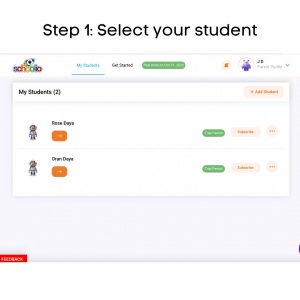
Step 1: Select Your Student.

If you have multiple children registered on your account, you will need to choose the student for which you are adding to the planner on the Schoolio Digital Platform. Click on the orange right-facing arrow of the student that you’d like to customize the planner for. 

Step 4: Scroll Down

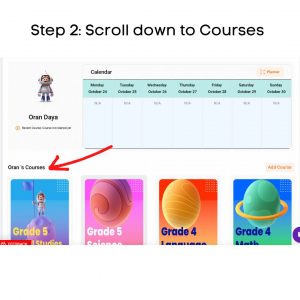
Step 2: Scroll Down to see Your Child’s Courses.

Once you have made it to your student’s portal, scroll down until you see your child’s courses.

Step 3: Open the Course

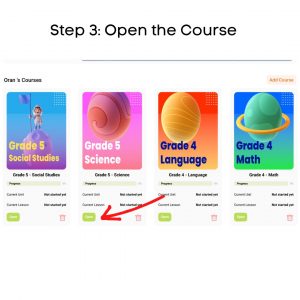
Step 3: Select the Course You’d like to Download from.

Now that you have located your child’s courses, you can select the course you’d like to print from. Once you find the course you’d like to print from, click the green ‘open’ button underneath the course’s thumbnail.

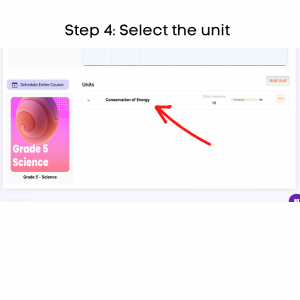
Step 4: Select the unit

Step 4: Select the Unit.

When you select the course you’d like to download and print lessons from; you will be taken directly to the course. Now, you can choose the unit you want to work with. Click on the unit that you’d like to work from. 

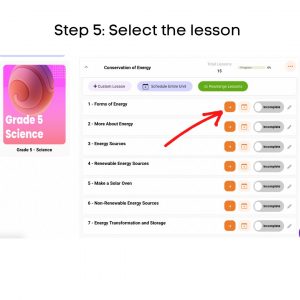
Step 5: Select the lesson

Step 5: Select the Lesson.

When you have selected the unit, you will be taken to that units page which will list all the lessons available in the unit; choose the lesson you want to download and print from by clicking the orange arrow. 

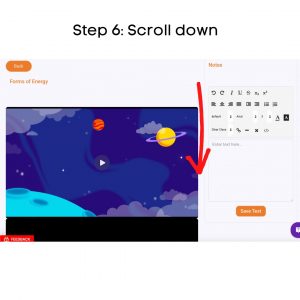
Step 6: Scroll down

Step 6: Scroll to Below the Lesson Video.

Now that you are on the lesson page scroll down below the lesson’s video.

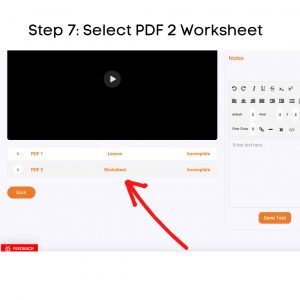
Step 7: Select PDF

Step 7: Select the PDF 2 Worksheet.

You will see two options at the bottom of the lesson’s video. PDF1 Lesson and PDF2 Worksheet. The lesson is the hard copy of the lesson that your child watched the video of. You can download this for further lesson study or discussion. For the worksheet, click the white arrow beside PDF2. 

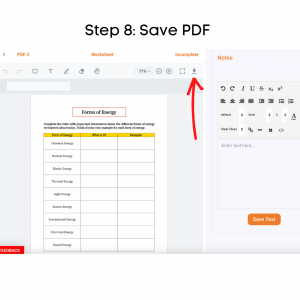
Step 8: Save PDF

Step 8: Download the PDF to Your Device.

Now that you have successfully opened the worksheet PDF, you can push the arrow at the top right-hand side of the worksheet that looks like an arrow pointing down towards a line.

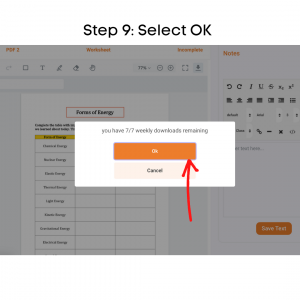
Step 9: Select OK

Step 9: Select OK.

Once you have pushed the arrow pointing down, it will tell you how many pdf downloads you have left for the week. Select the orange ‘OK’ button to continue. 

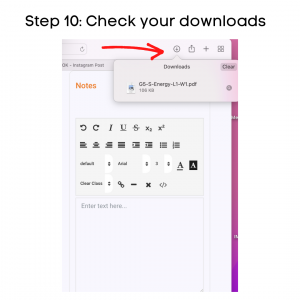
Step 10: Check your downloads

Step 10: Check Your Devices Downloads.

After downloading the pdf worksheet, check your computer’s downloads. Most downloads can be shown on the browser or the finder. Once you have located the download on your device, click on it. 

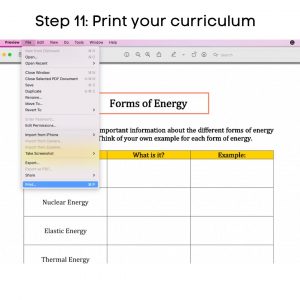
Step 11: Print your curriculum

Step 11: Print your curriculum.

Now that the worksheet PDF is on your computer, you can open it and select print. This may vary by which brand of computer you have. But all computers do or should have a printing option.

Step 12: Get started!

Now that you’re a pro at downloading and printing from the Schoolio Digital Platform, you are ready to start learning! Enjoy and have fun!

If you are confused about how to schedule lessons for your child, we have got you covered. Click here to learn about scheduling on the Schoolio Digital Planner. 

We hope you and your student will enjoy The Schoolio Digital Platform with over 4,000+ videos, interactives, and pre-made or custom lessons to suit your student’s learning style. If you are confused about how to get started, we are happy to help.

Book a Concierge Call.

If you aren’t sure how to get started or what programs would best suit your child’s learning needs, then you can chat with one of our experts on a one-on-one Concierge Call, completely free!
Click here to book a Concierge Call. 


Do you need more help downloading and printing from the Schoolio Digital Platform?

Check out this thorough explanation video all about downloading and printing from the Schoolio Digital Platform.

Click here for the video. 

How to Schedule Lessons on the Schoolio Digital Platform

How to Schedule Lessons on the Schoolio Digital Platform

Now that you have successfully added a course for your student on the Schoolio Digital Platform, you are ready to customize your learning schedule. In this blog, we will learn how to schedule lessons on the Schoolio Digital Platform.

There’s more than one way to add to your schedule on the Schoolio Digital Platform.

Did you know there is more than one way to add courses and lessons to your child’s schedule on the Schoolio Digital Platform? Let’s walk through both the options.

Option 1: Click Schedule on the Course or Unit

Option 1: Schedule

When you select the student you’d like to schedule, you can click ‘schedule’ at the bottom of the unit or course you want to add. Once you have selected the unit it will take you to the lessons page where you can schedule the course.

Select the date and time

You can now select the day and time you want your student to complete the lesson. Additionally, you will have the option to repeat the lesson plan with how you’d like. Then you are able to select the interval for 1 week, 2 weeks or more.

Option 2: Schedule from the planner

Calendar Overview

Once on the Calendar overview, you can schedule a lesson by selecting the ‘schedule lesson’ button.

Calendar Overview

When you click ‘schedule lesson,’ you will see the menu to select the lesson that you’d like to add to the schedule. Select the course, unit and lesson, then select the day and time. You can either click ‘save’ and continue on or ‘save and new’ to add additional lessons to the planner.

Now you can get started!

Now that you have added a lesson to the planner, you are ready to start learning! Enjoy and have fun!

If you aren’t seeing all the courses you’d like for your child, you can always add more! Click here to learn about adding a course to the Schoolio Digital Platform.

We hope you and your student will enjoy The Schoolio Digital Platform with over 4,000+ videos, interactives, and pre-made or custom lessons to suit your student’s learning style. If you need clarification about how to get started, we are happy to help.

Book a Concierge Call.

If you need help with how to get started or what programs would best suit your child’s learning needs, then you can chat with one of our experts on a one-on-one Concierge Call, completely free!
Click here to book a Concierge Call. 

Do you need further information about how to schedule a lesson?

Check out this thorough explanation video on adding to the planner on the Schoolio Digital Platform!

https://youtu.be/v0hpiwRJwLU

Click here for video.

Adding a Course on the Schoolio Digital Platform

Adding a Course on the Schoolio Digital Platform

The Schoolio Digital Platform offers 4,000+ video lessons, worksheets, interactives, lesson quizzes, and more for a super affordable price. Covering all the core curriculum for grades one to eight. Now that you have signed up your student and subscribed to the Schoolio Digital Platform, you are reading to take the next step: Adding a course on the Schoolio Digital Platform. 

Let’s Get Ready to Add a Course on the Schoolio Digital Platform! 

Now that you have successfully subscribed to the Schoolio Digital Platform, you can take your next step: Add courses for your student on the platform. If you’ve already added your courses when registering your students, you can leave it how it is; however, if you’d like to customize the courses and add more, you can follow these steps.

Step 1: Browse By Marketplace or Add a Custom Course 

How to Add a Course on the Schoolio Digital Platform

You’re almost ready to begin your homeschooling journey on Schoolio Digital. First, select courses for your child to get started. You can either Browse by Marketplace or Create a Custom Course. The marketplace is where you will find all the core curriculum for your child’s grade. Adding a customer course is something that you can do for electives. You can learn more by clicking on the highlighted ‘Custom Course’ in blue. 

Step 2: Select the Courses or Units that You Need

Step 2: Select the Courses or units

You can select the courses or units you want based on your child’s learning needs and grades. Simply click ‘Add to Cart’ on the course that you are looking for.

Step 3: Add Course

Add Course

Your third step will be to click ‘add’ on your shopping cart; you’ll notice that almost everything on the Schoolio Digital Platform is $0. This is because all core subjects are included on the Schoolio Digital Platform. When you see a price on a unit on the Schoolio Digital Platform, it is because it isn’t a core curriculum piece but rather an elective.

Step 4: Get started!

All curriculum bundles or units that you add will appear on your child’s lesson portal for you to assign for them.

Book a Concierge Call.

If you need help with how to get started or what programs would best suit your child’s learning needs, then you can chat with one of our experts on a one-on-one Concierge Call, completely free!
Click here to book a Concierge Call. 

Need a little more help with adding courses?

Check out this thorough explanation video on adding a course on the Schoolio Digital Platform.

https://youtu.be/cWikSVEjIGA
Learn how to add a course

How to Add a Student to the Schoolio Digital Platform.

How to Add a Student to the Schoolio Digital Platform.

Are you new to the Schoolio Digital Platform? Using the Schoolio digital platform might overwhelm you, and learning a new digital system can be confusing! That’s why we are here to help guide you through every step on the Schoolio Digital platform so that you and your student will be successful while bringing fun back into learning. This blog will teach how to add a student to the Schoolio Digital Platform.

Let’s Learn How to Add a Student to the Schoolio Digital Platform.

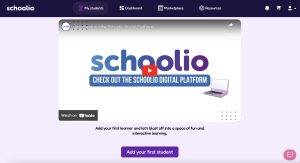
Adding a student to your account is much easier than you’d think. First, head to your account and sign in. Once you’ve signed in, you will be prompted to add your first student on the Schoolio Digital Platform.

Step 1: Add Your First Student 

How to Add a Student on the Schoolio Digital Platform

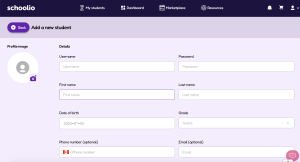
Add Student Details:

Once you have clicked the Add Your First Student Button, you will be taken to the student details page. You can go ahead and enter your student’s information here. Fill out the required fields: Student Username, Student’s Password, First Name, and Date of Birth. Then select your child’s school grade. (Don’t stress too much about this, as the courses are customizable. So, if your child is technically in grade 4 but needs a grade 3 level math, you can select that once you get to the courses.)

You can add the courses automatically or wait and add them later. Just to remind you, your student’s email and phone number are entirely optional. Now you can save your changes.

Step 2: Add Student Details

Student Details

Your Next Step is to Subscribe Your Student on the Schoolio Digital Platform.

You’re ready to go!

Now that you’ve completed all the steps for signing up, you can subscribe your student on the Schoolio Digital Platform to gain access to over 4,000+ videos and lessons.

Book a Concierge Call.

If you need help with how to get started or what programs would best suit your child’s learning needs, then you can chat with one of our experts on a one-on-one Concierge Call, completely free!
Click here to book a Concierge Call.

For more information on how to add a student on the Schoolio Digital Platform check out this video:

Now it’s time for your next step! Adding a course to your Digital Platform.

Click here for information to subscribe a student.