Do You Need to Overthrow the Schedule for January?

New Year, New You?: Do You Need to Overthrow the Schedule for January?

Written by Chelsea McLeod

It’s a new year; is it going to be a new you? Are you anticipating a significant change this year or hoping to keep it relatively status quo? Some people find it necessary to make significant changes and completely revamp routines, family plans and schedules. Others are happy to settle into the familiar routines and schedules that worked before the holidays.

As we know, January is typically the time for reflecting on the past year with its successes, failures, wins and losses, drafting resolutions, setting goals and making plans to accomplish for the new year. It is also the time for getting back to routine after a hopefully relaxing holiday break. After a week or two of late nights, travel, sleep-ins and, in many cases, not knowing what day it is, you and your kiddos are likely feeling ready for the consistency that routinely brings. So this begs the question: Do you need to overthrow the schedule for January?

“Do what works for you and your family; you know best.” 

It comes down to personal preference and what you know will work for you and your kids. Some people thrive on change and the excitement that comes from a difference from the normal. Others need that structure, predictability and consistency in their lives. You know yourself and your kids best, so make sure to consider that before making a significant change when asking yourself, ‘do you need to overthrow the schedule for January?’ 

Finally, there is no harm in keeping things the same if that’s what works best for your family; maybe there is something in your previous routine that you need to change for you or your kids to be successful or learn better. If this is the case and you feel a change is needed after a break is the best time to make any changes since you and your family have already been out of routine. So, in essence, what you do in January is entirely up to you, so change things up…Or don’t; you are entirely and totally in charge of your homeschool schedule. Do what works for you and your family; you know best.


Change things up.

New homeschool year

Why not let the New Year work for you by changing things up? 

You could try some of the following suggestions to see if they work for your family during the New Year:

  • Add something new to your homeschool plans.

    • You could try a new tactic for Art, like a Schoolio Art Class or add an Audiobook for listening comprehension skills. Or you could add some hands-on activities to your math program instead of pencil/paperwork.
  • Do something different.

    • Maybe you have been following a book program for math or ELA. You could try a more computer-based program, like Schoolio Digital, to change it up in January.
  • Switch up the schedule. 

    • Maybe you have done Reading first thing up until this point? It could be time to change that up and do your Math when you first begin your homeschooling day.
    • Or maybe plan a daily time slot for fun reading. Books and things that are not part of the learning plan. It’s essential to read, and many of us would prefer to do so with a book we are interested in, not one that has been assigned; this goes for kids as well. Also, this gives you an excellent opportunity to read yourself and model reading behaviour. Sometimes the best way to learn is to watch others.
  • Join a homeschool co-op, a book club, or start your own. 

    • Depending on where you are, there are many options for a Homeschooling Co-op. You could join a local chapter; they often meet once a week for learning and sometimes plan field trips together.
  • Make tents or blanket forts and let your children do their school underneath. 

    • Kids love forts! There is something so fun about a homemade tent/fort with lots of pillows and twinkly lights.
  • Have a hot chocolate dreaming party next to the fireplace. 

    • This could be a break during the day or planned as an evening after supper. Just a great way to connect with your kids and spend time together. Talk about school or don’t, enjoy each other’s company.
  • Plan a living room slumber party and talk about family bucket lists.

    • This does not have to be specific to before I die; in recent years, people have begun making “bucket lists” for other time frames, such as before I graduate or before I turn 13, etc.
    • Enjoying your kids’ company and decompressing with them is also fun. You can create a bucket list for them and the family. Maybe you want to travel somewhere before your kids are a certain age. You can learn a lot about your kids when dreaming and talking about life plans, and your kids will appreciate being included in family planning.
  • Get outside!

    • In January, your kids would much rather be outside building a snowman than studying books, right? So why use that interest to plan your lesson and make them more engaging?
    • You could study snow, for example. You could measure snow in different states of matter, taste snow, and make snow cones, snow forts, and snowmen.
    • This could be the perfect opportunity to chart weather patterns. You and your kids could study your local weather patterns and compare them to others like Alaska, Iceland, or Sweden.
    • This might not work if you don’t live in a wintery location; however, you can constantly adjust to your environment. Maybe you need to study sand, the ocean, or the grass.

Or don’t.

Maybe you feel confident in the schedule and routines you planned at the beginning of your homeschooling year. Your kids were thriving with that schedule, and you are feeling good about your ability to juggle all the pieces. You Do Not have to change anything! No rule says January brings all kinds of changes, whether we like it or not.

Each family has a routine and schedule that works for them, and homeschooling is no different. You are in charge. Like Napoleon Hill once said, “You are the master of your destiny. You can influence, direct and control your environment. You can make your life what you want it to be.” So no, as asked in the title, You do not have to overthrow the schedule for January.

You can head right back into your pre-holiday routine, rest assured and with a smile. It is a New Year, but it doesn’t have to be a new schedule. So as we head into 2023, take some time to reflect and decide how to proceed with your homeschooling. Trust yourself, make whatever changes you need to make, or dust off that fall schedule and keep trucking. Enjoy. You Got This!


How to Schedule Lessons on the Schoolio Digital Platform

How to Schedule Lessons on the Schoolio Digital Platform

Now that you have successfully added a course for your student on the Schoolio Digital Platform, you are ready to customize your learning schedule. In this blog, we will learn how to schedule lessons on the Schoolio Digital Platform.

There’s more than one way to add to your schedule on the Schoolio Digital Platform.

Did you know there is more than one way to add courses and lessons to your child’s schedule on the Schoolio Digital Platform? Let’s walk through both the options.

Option 1: Click Schedule on the Course or Unit

Option 1: Schedule

When you select the student you’d like to schedule, you can click ‘schedule’ at the bottom of the unit or course you want to add. Once you have selected the unit it will take you to the lessons page where you can schedule the course.

Select the date and time

You can now select the day and time you want your student to complete the lesson. Additionally, you will have the option to repeat the lesson plan with how you’d like. Then you are able to select the interval for 1 week, 2 weeks or more.

Option 2: Schedule from the planner

Calendar Overview

Once on the Calendar overview, you can schedule a lesson by selecting the ‘schedule lesson’ button.

Calendar Overview

When you click ‘schedule lesson,’ you will see the menu to select the lesson that you’d like to add to the schedule. Select the course, unit and lesson, then select the day and time. You can either click ‘save’ and continue on or ‘save and new’ to add additional lessons to the planner.

Now you can get started!

Now that you have added a lesson to the planner, you are ready to start learning! Enjoy and have fun!

If you aren’t seeing all the courses you’d like for your child, you can always add more! Click here to learn about adding a course to the Schoolio Digital Platform.

We hope you and your student will enjoy The Schoolio Digital Platform with over 4,000+ videos, interactives, and pre-made or custom lessons to suit your student’s learning style. If you need clarification about how to get started, we are happy to help.

Book a Concierge Call.

If you need help with how to get started or what programs would best suit your child’s learning needs, then you can chat with one of our experts on a one-on-one Concierge Call, completely free!
Click here to book a Concierge Call. 

Do you need further information about how to schedule a lesson?

Check out this thorough explanation video on adding to the planner on the Schoolio Digital Platform!

https://youtu.be/v0hpiwRJwLU

Click here for video.

Adding a Course on the Schoolio Digital Platform

Adding a Course on the Schoolio Digital Platform

The Schoolio Digital Platform offers 4,000+ video lessons, worksheets, interactives, lesson quizzes, and more for a super affordable price. Covering all the core curriculum for grades one to eight. Now that you have signed up your student and subscribed to the Schoolio Digital Platform, you are reading to take the next step: Adding a course on the Schoolio Digital Platform. 

Let’s Get Ready to Add a Course on the Schoolio Digital Platform! 

Now that you have successfully subscribed to the Schoolio Digital Platform, you can take your next step: Add courses for your student on the platform. If you’ve already added your courses when registering your students, you can leave it how it is; however, if you’d like to customize the courses and add more, you can follow these steps.

Step 1: Browse By Marketplace or Add a Custom Course 

How to Add a Course on the Schoolio Digital Platform

You’re almost ready to begin your homeschooling journey on Schoolio Digital. First, select courses for your child to get started. You can either Browse by Marketplace or Create a Custom Course. The marketplace is where you will find all the core curriculum for your child’s grade. Adding a customer course is something that you can do for electives. You can learn more by clicking on the highlighted ‘Custom Course’ in blue. 

Step 2: Select the Courses or Units that You Need

Step 2: Select the Courses or units

You can select the courses or units you want based on your child’s learning needs and grades. Simply click ‘Add to Cart’ on the course that you are looking for.

Step 3: Add Course

Add Course

Your third step will be to click ‘add’ on your shopping cart; you’ll notice that almost everything on the Schoolio Digital Platform is $0. This is because all core subjects are included on the Schoolio Digital Platform. When you see a price on a unit on the Schoolio Digital Platform, it is because it isn’t a core curriculum piece but rather an elective.

Step 4: Get started!

All curriculum bundles or units that you add will appear on your child’s lesson portal for you to assign for them.

Book a Concierge Call.

If you need help with how to get started or what programs would best suit your child’s learning needs, then you can chat with one of our experts on a one-on-one Concierge Call, completely free!
Click here to book a Concierge Call. 

Need a little more help with adding courses?

Check out this thorough explanation video on adding a course on the Schoolio Digital Platform.

https://youtu.be/cWikSVEjIGA
Learn how to add a course

How to Add a Student to the Schoolio Digital Platform.

How to Add a Student to the Schoolio Digital Platform.

Are you new to the Schoolio Digital Platform? Using the Schoolio digital platform might overwhelm you, and learning a new digital system can be confusing! That’s why we are here to help guide you through every step on the Schoolio Digital platform so that you and your student will be successful while bringing fun back into learning. This blog will teach how to add a student to the Schoolio Digital Platform.

Let’s Learn How to Add a Student to the Schoolio Digital Platform.

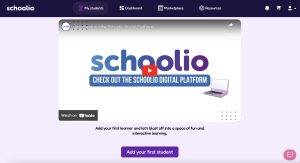
Adding a student to your account is much easier than you’d think. First, head to your account and sign in. Once you’ve signed in, you will be prompted to add your first student on the Schoolio Digital Platform.

Step 1: Add Your First Student 

How to Add a Student on the Schoolio Digital Platform

Add Student Details:

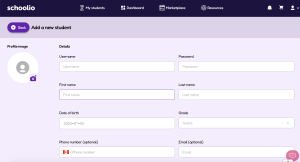
Once you have clicked the Add Your First Student Button, you will be taken to the student details page. You can go ahead and enter your student’s information here. Fill out the required fields: Student Username, Student’s Password, First Name, and Date of Birth. Then select your child’s school grade. (Don’t stress too much about this, as the courses are customizable. So, if your child is technically in grade 4 but needs a grade 3 level math, you can select that once you get to the courses.)

You can add the courses automatically or wait and add them later. Just to remind you, your student’s email and phone number are entirely optional. Now you can save your changes.

Step 2: Add Student Details

Student Details

Your Next Step is to Subscribe Your Student on the Schoolio Digital Platform.

You’re ready to go!

Now that you’ve completed all the steps for signing up, you can subscribe your student on the Schoolio Digital Platform to gain access to over 4,000+ videos and lessons.

Book a Concierge Call.

If you need help with how to get started or what programs would best suit your child’s learning needs, then you can chat with one of our experts on a one-on-one Concierge Call, completely free!
Click here to book a Concierge Call.

For more information on how to add a student on the Schoolio Digital Platform check out this video:

Now it’s time for your next step! Adding a course to your Digital Platform.

Click here for information to subscribe a student.