Cancelling Your Schoolio Subscription
At Schoolio we believe there is no one “right way” to learn. If Schoolio isn’t the right fit for you, or you don’t need us right now, we’re sad to lose you of course, but we understand.
If you’re considering cancelling because you found the platform difficult to use, you need technical support, or you don’t fully understand the program design or how the program is meant to work, we encourage you to reach out to use before cancelling. We’re here to help!
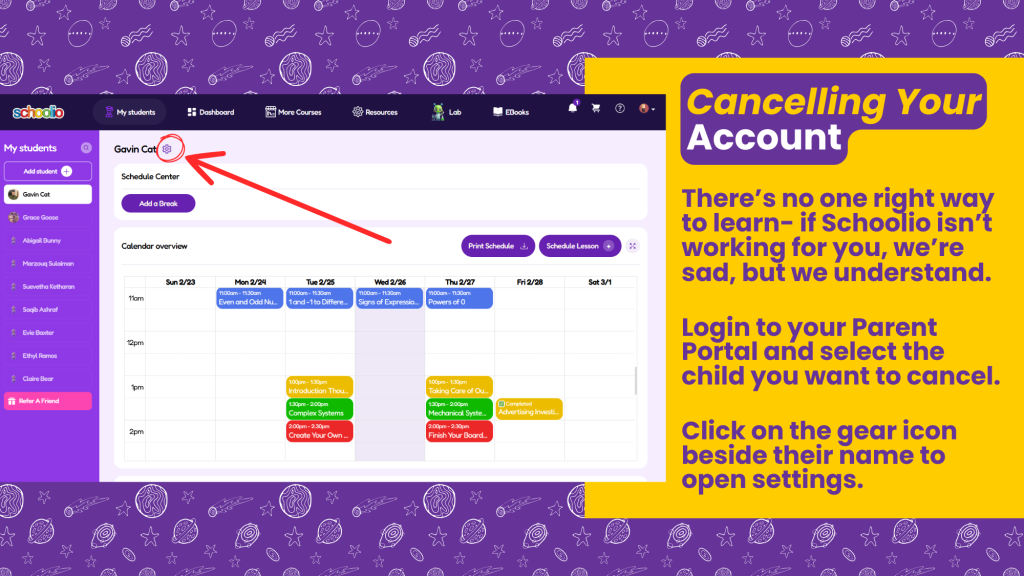
To cancel, simply login to your Parent Portal and choose the child from the sidebar that you would like to cancel a subscription for.
Click the gear icon beside their name to open Student Settings.
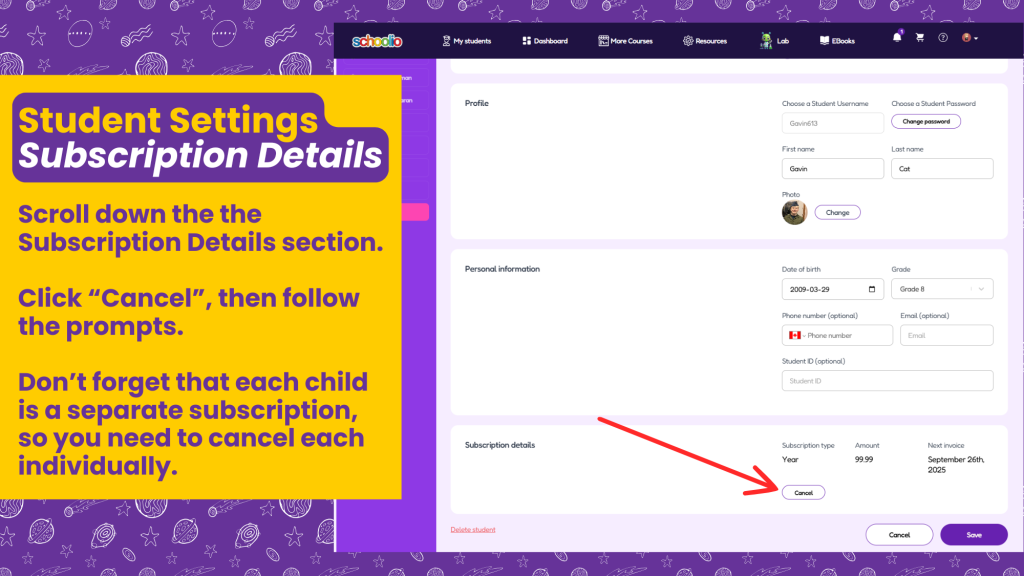
In Student Settings, you just scroll down the Subscription Details section.
Select “Cancel” and follow the prompts.
Don’t forget to repeat the process for each child you want to cancel. You will have access until the end of your current billing period, and all your child’s learning accomplishments will be saved if you ever want to restart your subscription!
We wish you all the best on your learning journey, and hope you’ll keep tabs on us as we continue to grow and improve!
You’re always welcome at Schoolio!