Worried Homeschooling Is Too Expensive? Here’s Your Defense Over the Costs

Worried Homeschooling Is Too Expensive? Here’s Your Defense Over the Costs


Yes, homeschooling has costs — but so does public school. The difference? You control what you spend and why.

I hear from parents considering homeschooling all the time…

“I want to start homeschooling… but what if I just can’t afford it?”

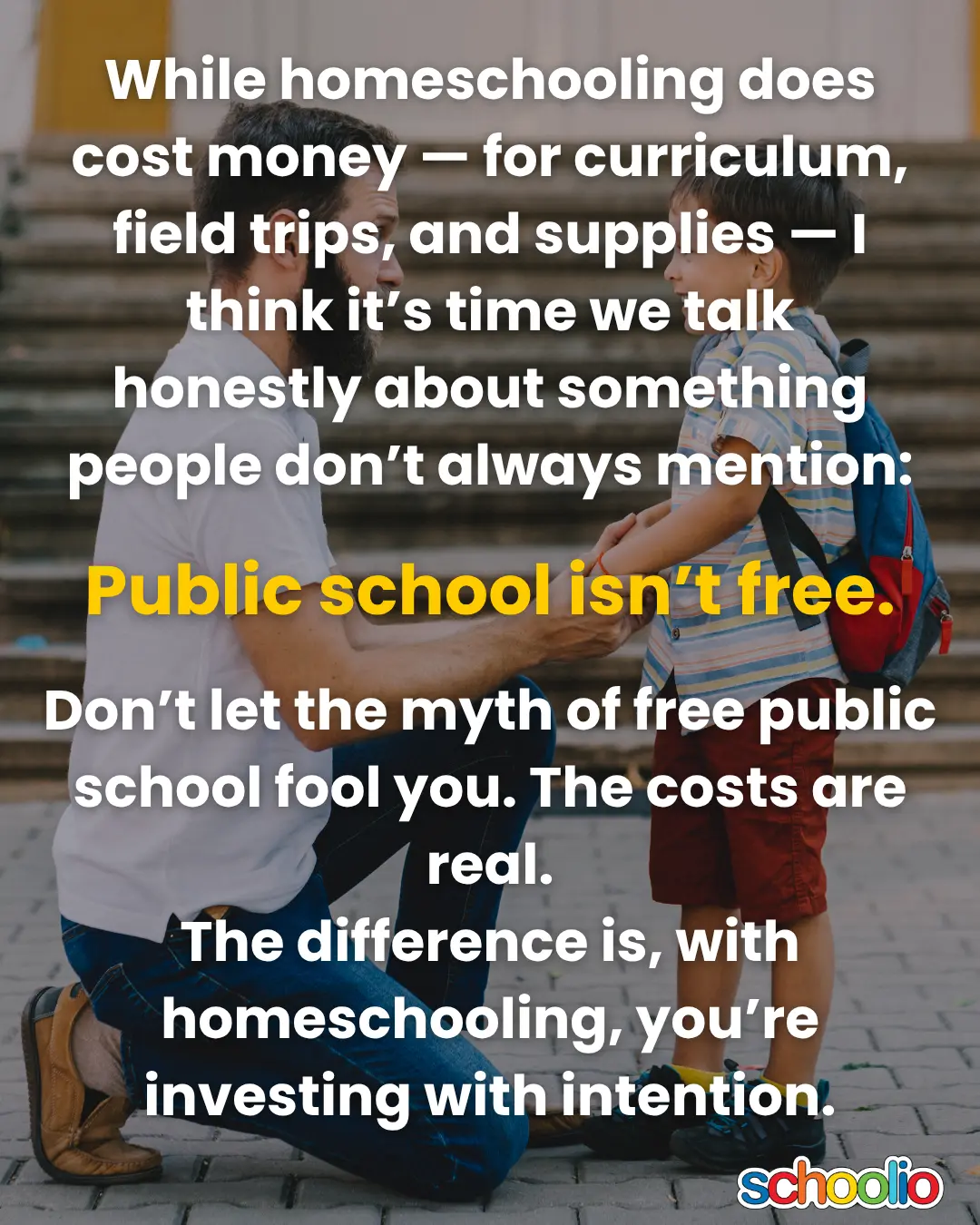
It’s a fair question. And while homeschooling does cost money — for curriculum, field trips, and supplies — I think it’s time we talk honestly about something people don’t always mention:

? Public school isn’t free.

The truth is, both paths have costs. But with homeschooling, you get to decide what you buy and how much you spend, based on your values and your child’s needs — not what’s written on a school form or fundraiser sheet.

Let’s break it down.


? How Much We Spend on Homeschooling

If you’ve met me, and a lot of you have, you probably know I’m an incurable Type-A planner. We also homeschooled our two kids on one income, as I know many of you are as well. For several years I tracked everything that was homeschool related, so I knew exactly how much we were spending on:

  • Curriculum
  • Field trips
  • Supplies
  • Anything we wouldn’t have spent otherwise if they were in school

But here’s the kicker…


vs. What We Spent in Public School (Hint: It Was More)

This spending tracking didn’t begin with homeschooling though- back when my kids were in public school, I also tracked our spending. Those years?

We spent almost $100 more per childfor free public school.

Here’s where that money went:

  • Back-to-school supplies (the specific ones required)
  • Indoor shoes, gym clothes, weather gear – and clothing replacements when they are lost and stolen
  • School events: BBQs, fairs, pizza day, candy cane day, milkshake day…
  • Valentines, classroom parties, book fairs, teacher gifts
  • Hot lunches and fundraiser purchases
  • Fad items and brand names your kids have to have in order to not be bullied

We weren’t even high-participation parents! We did just enough that our kids didn’t feel left out, but not every event or lunch or fundraiser.

And still? It added up.


? The Big Difference with Homeschooling: You’re in Control Now

Homeschooling gives you something public school doesn’t:

Control over what you spend — and what you get for it.

You decide:

  • Which curriculum to invest in (or whether to build your own)
  • How often you take field trips
  • Whether you spend more time or more money — whichever fits your family
  • What supplies, tools, or extras actually matter in your homeschool

You’re not just handing money over for a pizza party you didn’t ask for.

You’re choosing what best supports your child’s growth — and your family’s goals.


? Homeschooling Can Work on a Budget

You’ll spend either money or time — or some combination of both.

The beauty is: you get to choose what’s worth it.

Whether you’re middle-of-the-road spenders, doing things ultra-minimally with free resources and DIY everything, or have some room to buy back more time — there’s no one “right” budget for homeschooling.

But don’t let the myth of free public school fool you. The costs are real.

The difference is, with homeschooling, you’re investing with intention.

Lindsey

Certified Special Ed Educator & Co-Founder, Schoolio

Schoolio’s Enterprise Solutions: Empowering Schools and Groups

Schoolio’s Enterprise Solutions: Empowering Schools and Groups

Schoolio's Enterprise Solutions: Empowering Schools and Groups

Recognizing the need for innovative solutions, Schoolio has emerged as a key player in the educational technology arena, providing a powerful Learning Platform tailored for schools and groups. In this blog post, we’ll delve into the ways Schoolio’s Enterprise Solutions are transforming the educational landscape and explore the numerous benefits that come with incorporating this platform into your school or group.

Benefits of Using Schoolio with Your School/Group:

1. Streamlined Learning Assignments:

Schoolio’s Learning Platform facilitates the seamless creation and distribution of in-class assignments. Teachers can effortlessly design engaging and interactive lessons, adapting to the diverse learning styles of their students. The platform’s user-friendly interface ensures a smooth experience for both educators and learners.

Schoolio Family Plan

2. Affordability for All:

At the heart of Schoolio’s mission is the commitment to making education accessible and affordable for everyone. By choosing Schoolio’s Enterprise Solutions, schools and groups can benefit from cost-effective technology that doesn’t compromise on quality. This affordability ensures that educational resources are within reach for institutions of all sizes.

3. Customizable Learning Paths:

One size does not fit all in education. Schoolio understands the importance of personalized learning experiences. The platform allows educators to tailor assignments and coursework to individual student needs, fostering a more inclusive and effective learning environment.

4. Real-time Progress Tracking:

Stay informed about your students’ progress with Schoolio’s real-time tracking features. Teachers can monitor individual and class-wide performance, identify areas of strength and weakness, and provide timely support where needed. This data-driven approach enhances the overall efficacy of teaching and learning.

Schoolio e-books

5. Collaborative Engagement:

Schoolio encourages collaborative learning by providing tools that facilitate group projects and discussions. Through the platform, students can collaborate on assignments, share ideas, and engage in meaningful discussions, fostering a sense of community within the learning environment.

6. Resource Optimization:

Say goodbye to traditional paper-based assignments and embrace a more sustainable approach. Schoolio’s digital platform reduces the need for excessive printing and manual record-keeping, contributing to a more environmentally friendly and resource-efficient educational system.

Let’s Shape the Future of Education for a Brighter Tomorrow

Incorporating Schoolio’s Enterprise Solutions into your school or group brings with it a myriad of benefits, ranging from affordability to enhanced learning experiences. As we navigate the future of education, Schoolio remains committed to empowering schools and groups with the tools they need to thrive in the digital age. If you’re interested in learning more about how Schoolio can revolutionize your educational practices, we invite you to inquire for more information. Together, let’s shape the future of education for a brighter tomorrow.

Schoolio Learning Resources

Does Your Student Hate Writing?

Does Your Student Hate Writing?: 

Tips and Tricks to Make It Easier

By: Chelsea McLeod

Hate writing?

Has your writing time become the bane of your existence, the most challenging part of your homeschooling routine? Is your kid miserable when It comes time to practice writing? Are they pushing back, getting easily frustrated, complaining, avoiding and completely shutting down and refusing to do it? 

At Schoolio, we get it; writing can be tricky even for adults. Many of us don’t practice it regularly.  Unless the writing is work-related, it’s not something we would sit down and do in our spare time. So while we all understand that it is an essential skill that we all need to learn and practice often, it is also crucial to keep it fun, light and engaging if we want our kids to practice it without a fight. 

Writing Doesn’t Have to Be Boring! Keep it Kid-Friendly.

Just like with anything else, kids need us to change things up. Do you like it when things are always the same at work? While routine is essential, and our days should be structured similarly in the homeschool environment, adding different activities and trying new things is essential. So here are some kid-friendly ideas to keep your student guessing and having fun while doing something they don’t particularly like: Writing. With any luck, doing some of these activities might make them forget about their dislike for a while!

Kid Friendly Writing

Have You Tried to Have Them…

1. Write what they want to write about

    • Practice makes perfect, right? So what better way to influence your student to want to practice than writing about whatever they want? What we are trying to encourage here is to get them writing. It doesn’t matter what it’s about or why they want to write it, just that they are writing and therefore practicing a critical skill. They can write a letter to a friend, a diary or a journal entry, a story, a description of a game they created, etc. You get the idea; the sky’s the limit, and they will want to practice more because they aren’t being told what to do and how to do it.  

2. Write a step-by-step instructions piece, and you do what they write about… This is hilarious and very informative on missing steps rather than you harping on it.

  • Speaking of being told what to do, your student could write a step-by-step instructional guide on a topic of their choice or one you give them but keep it fun. For example, “How To….” Make a Peanut Butter and Jam Sandwich, as seen in this video. The kids have written the instructions, and the Dad follows them to the letter.  (TW, you will have to gauge your learners here, this may not be an excellent option for students who are easily frustrated or discouraged because it will be wrong several times before it is done correctly.)
  • The key here is first to have your students write uninterrupted with no interference from you. Then you try to follow their instructions exactly as they wrote them. This is not only fun but also an “experiential learning opportunity” for them. Watching you complete their step-by-step, they can see in a funny way where they missed an instruction (or 3). In this way, they will learn that they need to be more detailed in their writing and have fun watching you perform a silly task. They might not even remember their writing because they will have a great time!

3. Write an alternative ending to their favourite book.

  • Again, writing doesn’t have to be boring.  It doesn’t have to be a miserable part of anyone’s day, which can be highlighted by using their favourite stories as inspiration.  Reading is a fun way to use imagination, support, and develop writing skills.
    Listening to books activates the same part of the brain as reading them. Therefore if they don’t have a favourite that they have read yet, they can choose something you have read to them. Often our kids and we have books we wish ended a certain way or want them to continue because we love the characters and story so much. So why not use that to your advantage during your homeschooling day? 

Creative writing

  • Having them choose a story they already enjoy and continue it the way their imagination leads them is an excellent way to promote longer writing. In this case, students will often write many more lines or pages than before because they aren’t worried about what you may think or what is correct. They are just following their imagination and writing for themselves. Maybe they will be so engrossed in this task that they will end it in such a way that they can write their very own sequel too!

Having fun is the easiest way to engage your student.

Sometimes planning and preparing for the homeschooling day can get overwhelming. You want to make sure you cover all required, touching on necessary topics and subjects, all while you fill the day with skill practice to ensure your student isn’t falling behind their peers. And while it is crucial your child learns the necessary skills and required curriculum to help them out in the world when they grow up, it is also important to remember that kids also learn while they play.

They often learn best by doing or playing through scenarios they live in, which is also something they could write about! Having fun is often the easiest and best way to engage their brains, and Writing is no different. We hope that this list has been informative and will help you move forward in planning your homeschooling time. School can be fun, and it doesn’t take complicated projects with many supplies to achieve—just some good, old-fashioned paper and a pencil, coupled with creativity and an open mind.

Book a Concierge Call.

If you aren’t sure how to get started or what programs would best suit your child’s learning needs, then you can chat with one of our experts on a one-on-one Concierge Call, completely free!
Click here to book a Concierge Call. 

Downloading and Printing from the Schoolio Digital Platform

Are you new to the Schoolio Digital Platform? Using the Schoolio digital platform might overwhelm you, and learning a new digital system can be confusing! That’s why we are here to help guide you through every step on the Schoolio Digital platform so that you and your student will be successful while bringing fun back into learning. Let’s learn about downloading and printing from the Schoolio Digital Platform. 

This blog will cover a basic concept about using the Schoolio digital platform; downloading and printing from the Schoolio Digital Platform is much easier than you’d think, so let’s dive in!

Downloading and Printing from the Schoolio Digital Platform.

Now that you have successfully added a student to your portal added courses to your students portal, and added courses to your planner, you can take your next step: downloading and printing from the Schoolio Digital Platform. You don’t have to download and print the pdfs that come with your video lessons, as you can annotate directly on the platform; however, many people enjoy downloading and printing the worksheets so that their child can still get crucial hands-on writing skills.

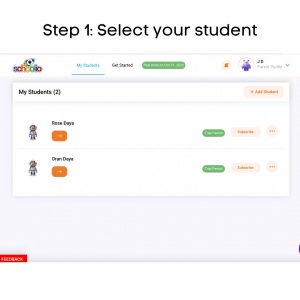
Step 1: Select your student

Step 1: Select Your Student.

If you have multiple children registered on your account, you will need to choose the student for which you are adding to the planner on the Schoolio Digital Platform. Click on the orange right-facing arrow of the student that you’d like to customize the planner for. 

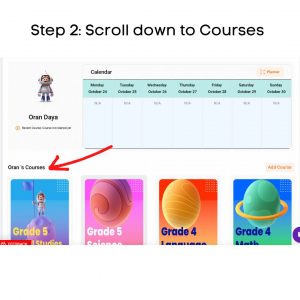
Step 4: Scroll Down

Step 2: Scroll Down to see Your Child’s Courses.

Once you have made it to your student’s portal, scroll down until you see your child’s courses.

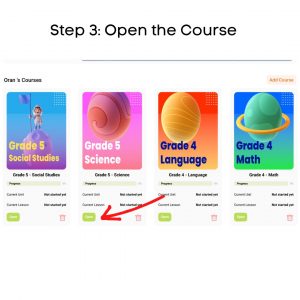
Step 3: Open the Course

Step 3: Select the Course You’d like to Download from.

Now that you have located your child’s courses, you can select the course you’d like to print from. Once you find the course you’d like to print from, click the green ‘open’ button underneath the course’s thumbnail.

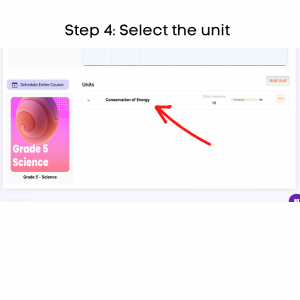
Step 4: Select the unit

Step 4: Select the Unit.

When you select the course you’d like to download and print lessons from; you will be taken directly to the course. Now, you can choose the unit you want to work with. Click on the unit that you’d like to work from. 

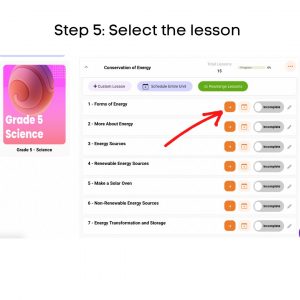
Step 5: Select the lesson

Step 5: Select the Lesson.

When you have selected the unit, you will be taken to that units page which will list all the lessons available in the unit; choose the lesson you want to download and print from by clicking the orange arrow. 

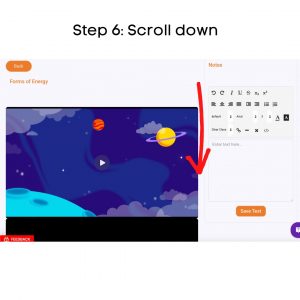
Step 6: Scroll down

Step 6: Scroll to Below the Lesson Video.

Now that you are on the lesson page scroll down below the lesson’s video.

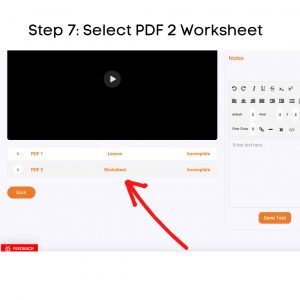
Step 7: Select PDF

Step 7: Select the PDF 2 Worksheet.

You will see two options at the bottom of the lesson’s video. PDF1 Lesson and PDF2 Worksheet. The lesson is the hard copy of the lesson that your child watched the video of. You can download this for further lesson study or discussion. For the worksheet, click the white arrow beside PDF2. 

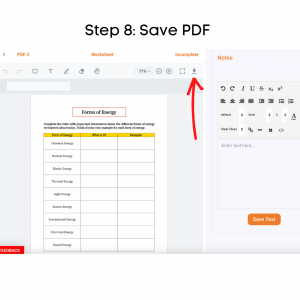
Step 8: Save PDF

Step 8: Download the PDF to Your Device.

Now that you have successfully opened the worksheet PDF, you can push the arrow at the top right-hand side of the worksheet that looks like an arrow pointing down towards a line.

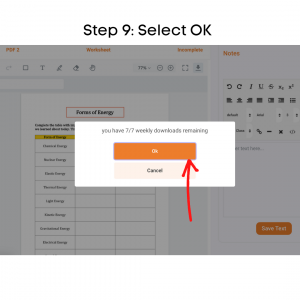
Step 9: Select OK

Step 9: Select OK.

Once you have pushed the arrow pointing down, it will tell you how many pdf downloads you have left for the week. Select the orange ‘OK’ button to continue. 

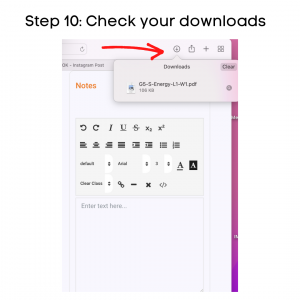
Step 10: Check your downloads

Step 10: Check Your Devices Downloads.

After downloading the pdf worksheet, check your computer’s downloads. Most downloads can be shown on the browser or the finder. Once you have located the download on your device, click on it. 

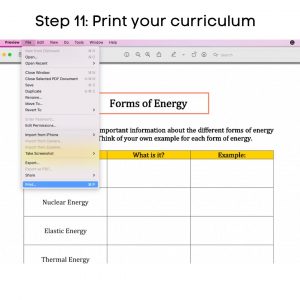
Step 11: Print your curriculum

Step 11: Print your curriculum.

Now that the worksheet PDF is on your computer, you can open it and select print. This may vary by which brand of computer you have. But all computers do or should have a printing option.

Step 12: Get started!

Now that you’re a pro at downloading and printing from the Schoolio Digital Platform, you are ready to start learning! Enjoy and have fun!

If you are confused about how to schedule lessons for your child, we have got you covered. Click here to learn about scheduling on the Schoolio Digital Planner. 

We hope you and your student will enjoy The Schoolio Digital Platform with over 4,000+ videos, interactives, and pre-made or custom lessons to suit your student’s learning style. If you are confused about how to get started, we are happy to help.

Book a Concierge Call.

If you aren’t sure how to get started or what programs would best suit your child’s learning needs, then you can chat with one of our experts on a one-on-one Concierge Call, completely free!
Click here to book a Concierge Call. 


Do you need more help downloading and printing from the Schoolio Digital Platform?

Check out this thorough explanation video all about downloading and printing from the Schoolio Digital Platform.

Click here for the video.